A ban that never expires has a flaw. The .htaccess file grows with every attack, and sooner or later it becomes huge. Version 1.0.18 of Cisilino Site Defense Network changes how the WordPress IP ban works: the duration is now your choice, and two new login protections arrive.
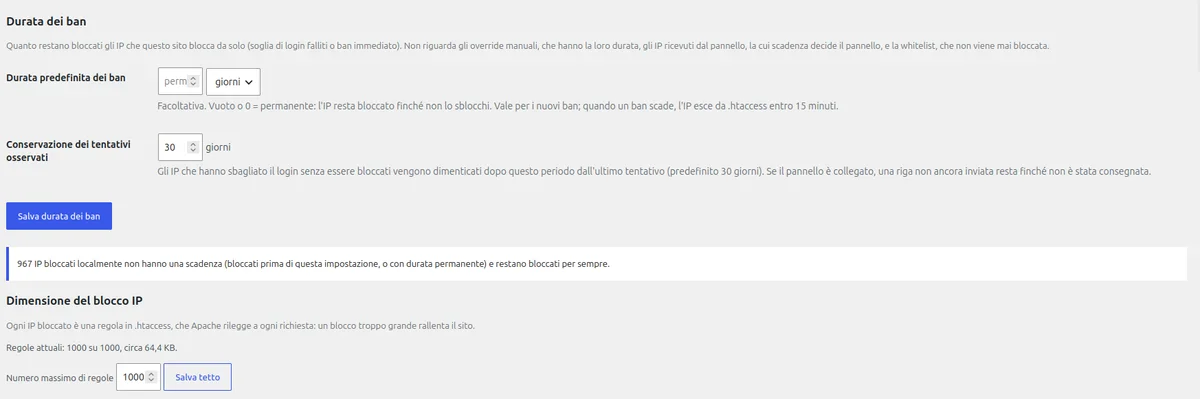
WordPress IP ban duration: you decide now
By default the field is empty. An IP blocked locally stays blocked until you unblock it. That is the old behaviour, so an update changes nothing by itself.
If you want blocks to expire, open Settings, then General, then Ban duration. Choose minutes, hours or days. If you had already saved a value, the plugin keeps it.
Bans that come from the panel follow their own date. If they have an expiry, they really leave the .htaccess block and the list of blocked IPs when it passes. Without an expiry they stay permanent.
A cap on .htaccess rules
Duration helps, but against a massive attack the WordPress IP ban alone is not enough. That is why the block has a cap on the number of rules. The default is 1000 and you can change it.
When the cap is exceeded, the oldest temporary bans go first. Then, if needed, the permanent ones too. The plugin warns you. In the General tab you see the current number of rules and the approximate size of the block.
The screenshot above (plugin in Italian) shows the extreme case: 1000 rules out of 1000, about 64 KB, with 967 blocked IPs without an expiry. Apache rereads that file on every request, so a block this large slows the site down.
The “Unblock” button now works for every source: local bans, panel bans and manual bans.
Users bound to an IP
This is the novelty in Paranoic Hardening, and it completes the WordPress IP ban on the login side. You can link a user to one or more IPs, or to a network in CIDR format. That user can only sign in from there.
Anyone who tries from another IP is turned away, even with the right password. The IP is banned on the first attempt. From the linked IPs, on the other hand, failed attempts are not counted and do not trigger the immediate ban. Sessions that are already open do not change.
The price is clear. If the user changes connection, they cannot sign in until you update the list. It suits an administrator who always works from the same office, less so someone who travels.
Your server’s own IPs do not ban themselves
The server’s public IPs, IPv4 and IPv6, are now always treated as trusted. The plugin works them out from the request and from the site’s DNS records, and keeps them in memory for 10 minutes. Moving the site to another server therefore does not end up banning the site itself.
What to do after the update
After the update a notice with the news appears once. Only people who can manage the plugin see it, and one click closes it. Then open the General tab and check whether the duration of the WordPress IP ban and the rule cap suit your site. The English, French, Spanish and German translations are up to date.
The plugin is in the WordPress.org repository.
Frequently asked questions
Do my existing bans expire when I update?
No. The duration field is empty by default and existing blocks stay as they were. If you had already saved a value, the plugin keeps it.
Can I unblock an IP banned by the panel?
Yes. The “Unblock” button in the list of blocked IPs works for local bans, panel bans and manual bans.
What happens to open sessions if I bind a user to an IP?
They do not change. The check applies to new logins.
Read more
- WordPress IP whitelist: manual unblocking and timed bans
- WordPress brute force attacks: how to stop them at the login
WordPress, Apache and the other names mentioned are trademarks of their respective owners. They are used only to identify the products.


Leave a Reply